
No terminal, no hunting –
it sets itself up
The most common worry before buying isn't the price, it's: “will I even get this installed?” Qwirbel guides you through setup on first launch and does the steps itself – from the right model to image generation.
Od 60 € · jednokratno plaćanje, bez pretplate · za Windows, Linux i macOS
Ono bitno
First question: fully local?
Right at the start you decide whether anything may leave the PC. Say yes and every cloud provider is hidden everywhere – changeable at any time later.
“Fits my card”
Qwirbel measures your video memory and honestly marks each model as suitable or not. No downloading 20 GB that then won't start.
Modeli jednim klikom
Instead of moving files into folders by hand: pick, click, wait. The ComfyUI base for images is fetched the same way.
One double-click per device
For laptop, company server and extra machine there is one setup file each. It asks in a window what it needs and validates your input before it starts.
Setup, step by step
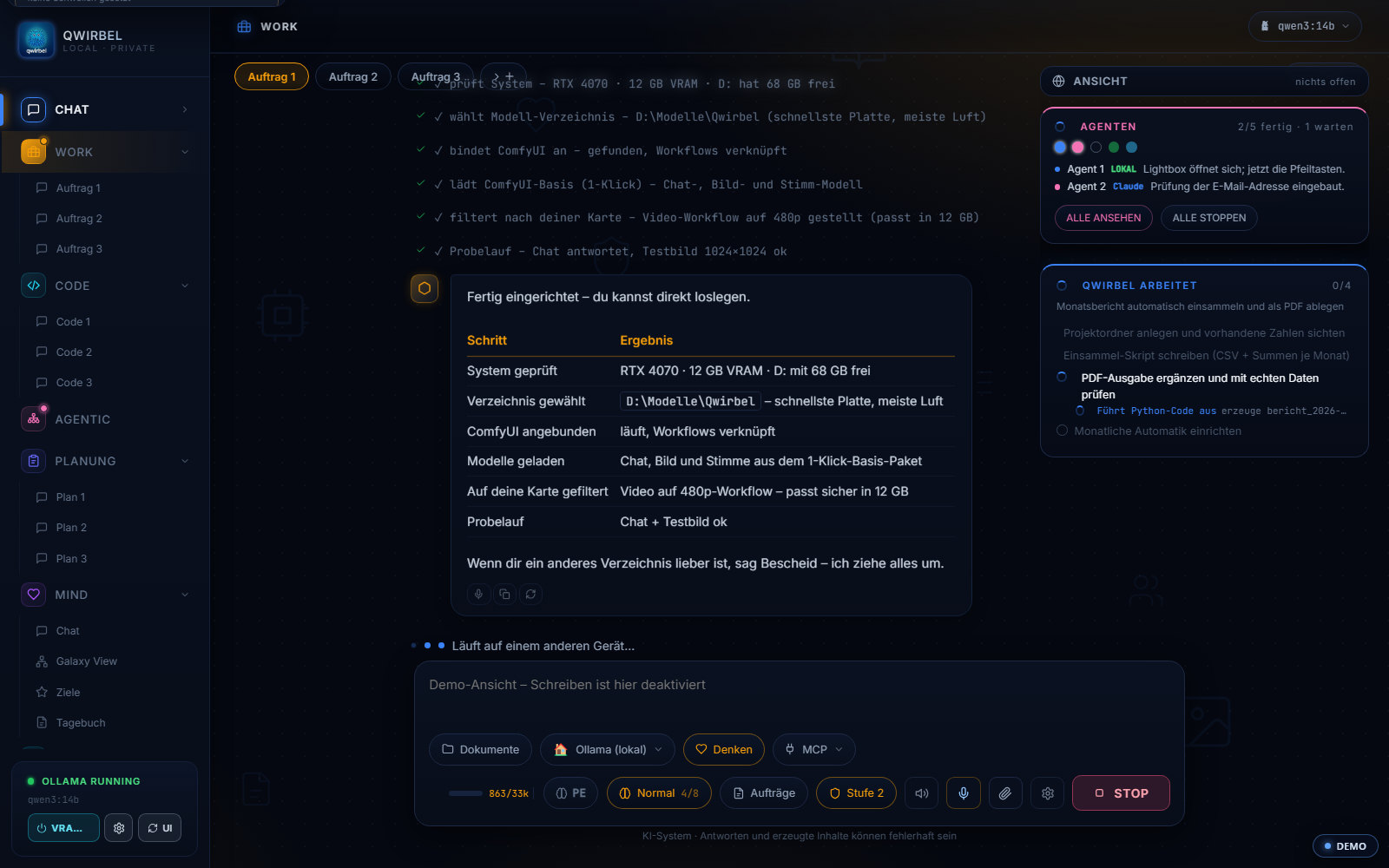
What the assistant actually does for you
Above says it sets itself up. Here is step by step what happens – and where you have to act.
What is checked on first launch
The assistant looks at what hardware is there, what is already installed and what is missing. It reads the graphics card itself – from several sources depending on the system – and states where each number comes from. If it finds no card, it says so instead of guessing a value.
Why ComfyUI comes from you
ComfyUI is under the GPL. That licence does not allow simply shipping the program without its terms reaching through to the whole package. So you install it yourself; the assistant walks you through step by step and then checks the connection actually stands. If no answer comes, Qwirbel says so with a reason instead of quietly pointing at a guessed port.
Models with one click, but not blindly
Chat, image and voice models download from inside the program into the right folder. Beforehand it states how large a version is and whether it fits your card – and one carries the recommendation: the largest that still runs comfortably. Downloads come only from vetted sources.
Where the large files go
Models are large, often tens of gigabytes. The assistant suggests a location with enough room, and you can change it – to a second drive too. Later, under Settings, Files and storage, you can see at any time what lives where, how much it takes and what deleting it would cost.
It is not a one-time event
Setup has its own tab and can be reopened whenever you like – for instance when a new graphics card goes into the machine or you want to add something. After an update Qwirbel asks exactly once what images should be created with, because that sort of thing changes.
Šta ljudi o tome pitaju
Do I have to use the command line?
No. For the normal route double-clicks are enough: set up, start, done. Anyone who prefers to do it by hand still can.
Why do I have to install ComfyUI myself?
For licensing reasons: ComfyUI is GPL software and therefore not bundled. Qwirbel walks you through the steps and downloads the right models into the right folder – no hunting around the web.
What if my graphics card is too weak?
Text models can run on the CPU if they must, just slower. For images a GPU is practically required. If your card doesn't carry the heavy jobs, you can add your own API key – or keep things small and local.
How long does setup take?
That depends on your connection: the steps themselves are quick, downloading the models is the long part. Qwirbel shows what is happening instead of waiting silently.
Ovo Qwirbel takođe zna
Sve sposobnosti žive u istoj aplikaciji – jedna kupovina, jedan ključ.