
Generate AI images –
right on your own PC
Image generation in Qwirbel runs entirely on your own graphics card. No subscription, no image quotas, no uploads to a provider – whatever you create stays on your drive.
From 60 € · one-time payment, no subscription · for Windows, Linux and macOS
The essentials
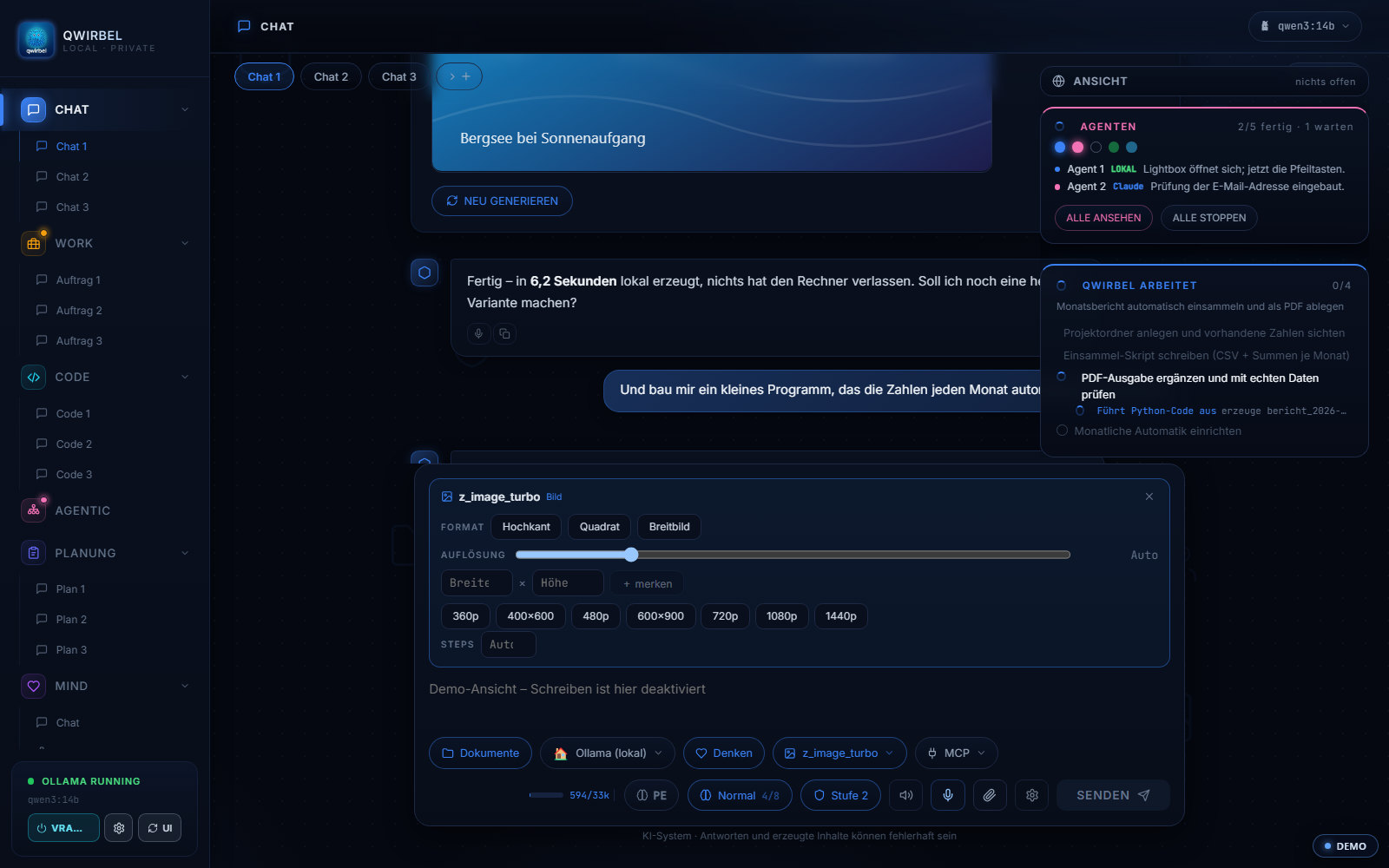
Right in the conversation
You describe the image in chat, Qwirbel creates it and shows it in the same place. No switching tools.
Flux and Qwen-Image
Both model families run locally via ComfyUI. You decide which model is used.
Your own limits
Resolution and step count can be fixed – or you let Qwirbel decide.
Your own workflows
If you like, import your own ComfyUI workflows and set your own limits.
Everything adjustable, right in the chat
What actually happens on your card
Above is what the feature does. Here is what it does it with – model names, memory, seconds. Open it if you want the detail.
Which models run – and what they are good at
Qwirbel ships 14 ready-made workflows and 46 model slots from 37 vetted sources. For images those are mainly: Z-Image (fast, good for first drafts), Qwen-Image and Qwen-Image-Edit (strong at text inside the image and at changing existing ones), FLUX.1 (currently the best all-purpose family), Chroma, Stable Diffusion 3.5 and SDXL (a huge choice of add-ons), HiDream and Lumina. Downloads come only from exactly those vetted sources – Qwirbel does not fetch anything from just anywhere.
How much video memory you need
Every model exists in several versions: the full file (bf16, best quality), fp8, and GGUF steps that are smaller. Expand a model in the library and you see each version with its size, an assessment of quality and speed, and an honest sentence on whether it fits your card – and what you lose by going one step down. One version carries the recommendation: the largest that still runs comfortably on your machine. From 8 GB the entry is realistic, from 12 GB it gets relaxed, from 24 GB size hardly matters. Qwirbel reads the card itself and states where each number comes from.
How long an image takes
That depends on model, resolution and step count. A fast model like z_image_turbo delivers in seconds on a mid-range card – the screenshot above took 6.2 seconds. Large FLUX versions at high resolution take a multiple of that. Because nothing goes over the network, there is no waiting in someone else's queue: your card is the only limit.
Enlarging and sharpening
Say "upscale that image" in chat, or use the button in the chat bar: factor 2x, 3x or 4x, pick the model yourself or let Qwirbel decide. Up to ten images at once – they run one after another, because there is only one seat on the graphics card; in parallel all of them would be slower. And Qwirbel never picks an upscaler that belongs to a particular video model – a photo would turn to mush.
Why you install ComfyUI yourself
ComfyUI is under the GPL. That licence does not allow simply shipping the program without its terms reaching through to the whole package. So you install it yourself – Qwirbel walks you through with its "ComfyUI base" feature: the right models land in the correct folder with one click, no terminal, no hunting. Qwirbel looks into every folder ComfyUI uses, external drives included – even when ComfyUI is not running.
Where the images end up
On your drive, in your output folder. There is no staging point, no upload and no copy on our side – for image generation Qwirbel talks only to the program on your own machine. Under Settings, Files and storage you can see every folder with size and purpose.
What people ask about this
Do I need a powerful graphics card?
For image generation a GPU (NVIDIA or AMD) is clearly recommended – it largely determines how fast an image is done. Qwirbel ships presets for 8, 12, 16 and 32 GB of video memory. For text-only models a CPU works, for images it is not practical.
How many images may I create?
As many as you like. There are no quotas and no per-image billing, because no external service is involved – the limit is your hardware and your time.
Do the generated images belong to me?
The images are created on your machine and stored there. Nothing is transmitted to us or to third parties. What rights generally exist in AI images depends on the model used and applicable law – we do not advise on that.
Do I have to install ComfyUI myself?
Yes, for licensing reasons (GPL) you install ComfyUI and the models yourself. Qwirbel guides you with its “ComfyUI base” feature: the right models can be downloaded into the correct folder with one click – no terminal, no searching.
Qwirbel can do this too
All capabilities live in the same application – one purchase, one key.