
GLM as a strong engine –
when local isn't enough
Qwirbel is built local-first: models run on your card, nothing leaves the machine. If your hardware doesn't carry the heavy jobs, you can add your own API key. Qwirbel works best with GLM from z.ai – that is also the route we use ourselves.
부터 60 € · 한 번만 결제, 정기 요금 없음 · Windows, Linux, macOS용
핵심
Set up in two minutes
Create a key at z.ai, enter it in Qwirbel under Settings → APIs, done. From then on GLM appears in the model picker – you decide per message who answers.
Drives the agent loop
GLM is built for tool use. That is exactly what the Work and Code tabs need: plan, touch files, verify, carry on – without the chain breaking.
Mixable with local
In the Agentic tab several providers may work at once. The small stuff stays local on your card, the heavy jobs go to GLM – your GPU stays free.
Your graphics card stays free
When you work through a provider, the side tasks run there too – chat names, sorting, summarising. Nothing is loaded locally for them any more, and nothing at all at startup. That used to be the reason a machine crawled for minutes despite the answer coming from the cloud.
Off again whenever you want
One click on “Fully local” under Settings → AI & filter hides every cloud provider and blocks every call. You decide, not us.
This is where your key goes
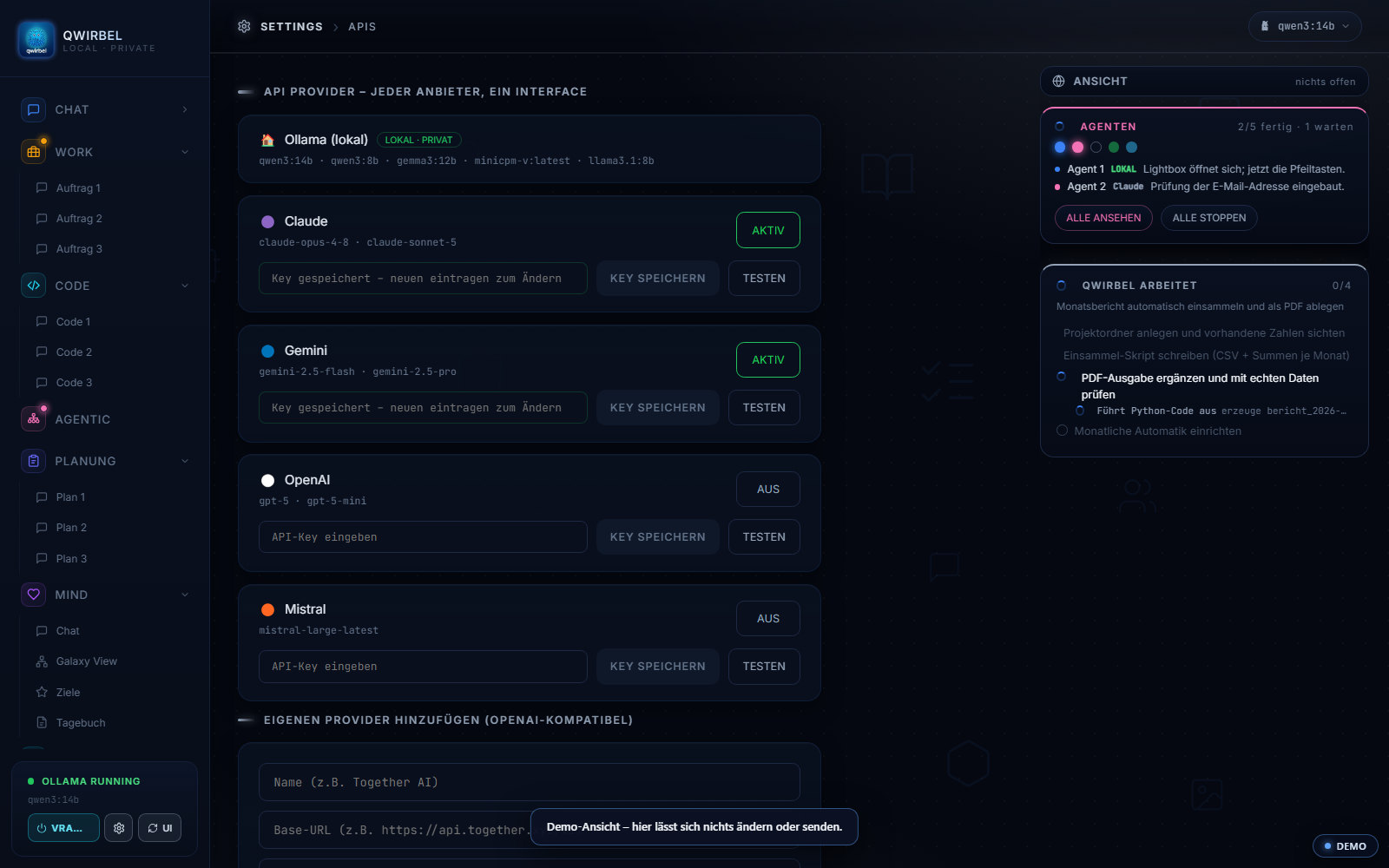
What the interplay looks like technically
Above is what it is good for. Here is what happens where, what is transmitted, and how you switch it off again.
Where the key lives and what happens to it
The key is entered in the settings under APIs and stays on your device. It does not go to us – we do not sit in between and earn nothing from your usage. Billing runs directly between you and the provider.
What is transmitted when you use it
Exactly the request you make to that model, and its answer – to exactly that provider, not to us. What you do locally stays local. There is no silent rerouting: since v2.9.0 a single point decides per request who computes, instead of several scattered branches.
Your graphics card stays free
Once you have picked a provider, side tasks run there too – chat titles, summaries. Nothing is loaded locally for them, and nothing at all at program start. That is the real gain for machines whose card is not enough for large models.
How to switch it off again
The "Fully local" switch removes every provider with one click – after that only your device computes. In the Server edition this can be set centrally for all accounts, which is the decisive point for companies.
What we deliberately do NOT say about tariffs
We name no prices and no quotas here. The provider changes its tariffs frequently, and a figure on this page would soon be wrong. We ourselves use an ordinary pay-as-you-go key – exactly what Qwirbel expects under Settings, APIs. Anyone considering a monthly plan should check with the provider first whether it can be used outside the programs listed there.
이것에 대해 사람들이 묻는 것
Why GLM in particular?
Because it runs most smoothly inside Qwirbel. GLM is an open model built for agent work and coding – exactly what Qwirbel does in the Work and Code tabs. Other providers (Claude, Gemini, OpenAI, Mistral) can be entered too; the choice stays yours.
What does it cost?
That is set by z.ai, not by us – and the plans change. There is a pure pay-as-you-go tariff (you pay for what you use) and monthly plans in several tiers with an allowance per time window. We ourselves use the pay-as-you-go tariff with an ordinary API key – that is exactly what Qwirbel expects under Settings → APIs. If you are eyeing a monthly plan, check with z.ai first whether it can also be used outside the programs listed there. Current prices and conditions are on z.ai; please check there before subscribing.
Is this a subscription for Qwirbel?
No. You pay for Qwirbel once, with no subscription – that does not change. An API key is an optional extra for people whose hardware doesn't keep up with the heavy jobs. Without a key Qwirbel keeps running fully locally.
Does my data leave the PC then?
For requests to an external provider, yes – and Qwirbel says so openly. Tasks, files and image generation always stay local, external models only answer. The Mind chat stays completely local. If you don't want that at all, leave “Fully local” switched on.
Do I need keys for the Server edition too?
No, but it pays off: in the Server edition IT can decide per employee which models are released. So staff work locally, and only those who really need it get the external engine as well.
Qwirbel은 이것도 합니다
모든 능력이 같은 프로그램 안에 있습니다. 한 번 사면 열쇠도 하나.