
AI agents that actually
carry tasks out
An agent plans a task, carries it out with tools and checks the result at the end. For risky steps it asks first – and all of it happens on your own machine.
No 60 € · vienreizējs maksājums, bez abonementa · Windows, Linux un macOS
Būtība
Plan, act, verify
The sequence is fixed: analyse, plan, execute, verify, learn.
Confirmation for risky steps
Deleting or overwriting asks first instead of just acting.
Real tools
Files, web (via allow-list) and system; the agent can also run Python code.
Does not forget mid-job
The history follows the model that is actually running – a large cloud model gets its full window instead of the small local one. That is why the agent no longer re-reads the same files in long jobs. If space does run short, the chat is saved in full first and only then trimmed.
On a schedule
Recurring tasks run manually, on an interval, daily or weekly.
Vairāki aģenti vienlaikus
In the Agentic tab one line is one job: the agents work in parallel, each with its own card and history. Local and optional cloud providers can be mixed.
The tool list adapts to the model
A smaller local model gets a compact core list instead of every tool – that way it reaches for tools reliably instead of tripping over the length of the list. Large local models and cloud providers still see everything.
The swarm at work
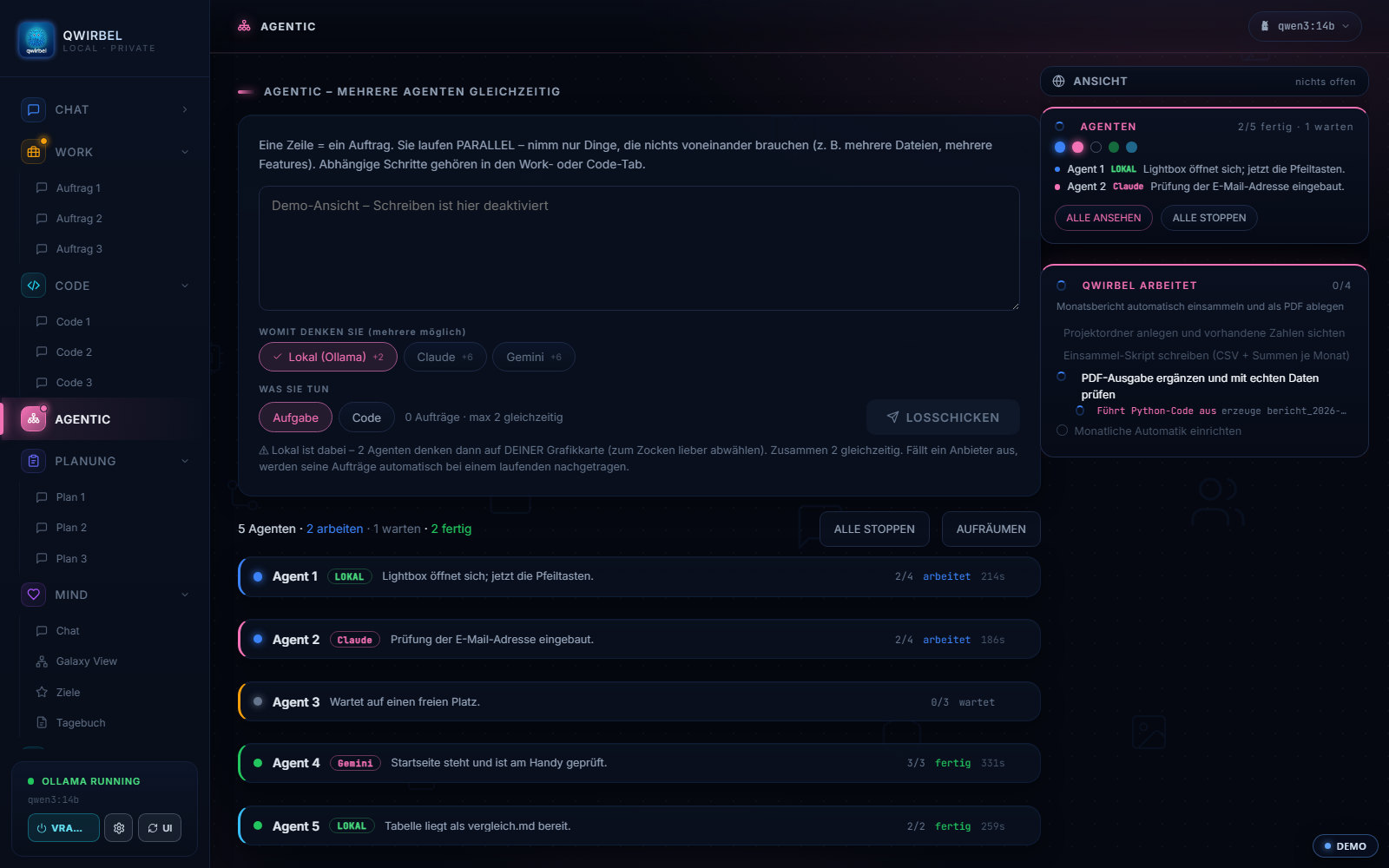
How the agent works – and where its limits are
Above is what it does. Here is how – the sequence, the permissions, the limits, and what happens when something goes wrong.
The sequence behind a job
Analyse, plan, execute, verify, learn from it. The agent reads what is there first, makes a plan, works through it and checks the result against the goal – not merely whether a command ran. For code, verifying means it tests what it wrote. For a general task, it checks whether the result answers the question.
How far it may go
The permission level decides, in steps you can read: level 2 is called "working folder" and shows a folder, level 7 is called "tidy up" and shows a broom. Before anything that cannot be taken back – deleting, overwriting, installing – it asks and shows exactly what it intends. That cannot be switched off by accident.
Several agents at once – and the honest limit
Locally two agents run side by side, because they share your graphics card; more would make all of them slower, not faster. Purely through cloud providers up to six are possible. These numbers are stated openly in the program, instead of Qwirbel starting a handful and then quietly stalling. A swarm may be mixed: one computes locally, two through keys you entered yourself.
What it no longer forgets
Since v2.1.0 the history follows the model actually running. Before that a large model could use only a fraction of its memory, because the model name was not passed along once a plan had been confirmed – so on long jobs the agent read the same files twice. When space runs short it now saves first, then trims.
When something hangs
The stop button really cuts the connection instead of asking politely. If nothing happens in the response stream for a while, Qwirbel aborts by itself rather than leaving you in front of a spinner. And since v2.9.0 skipped errors are no longer concealed – in 107 places it used to carry on silently.
A run from practice – and how to read it
The developer had Qwirbel build a Roblox map for a game from a plan – through the MCP tool interface, which drives Roblox Studio directly. The agent set the steps itself instead of being told each one, and further jobs were running alongside. This was done with a provider key. Two things so the expectation is right: this is a report from the developer's own machine, not a promise that every job runs through like that – how far an agent gets depends on the model, on the task, and on how precisely the plan is worded. And it works without a provider too: a local model needs the right parameters and enough video memory for it, spread across several machines through Hyperspace if necessary. What your card can carry, the program tells you itself under Settings and then AI & filter.
What you can read back
Every agent keeps its own trail: what it is doing, what is done, where it is stuck. You can call something out to individual ones, stop or clean them up one by one, without halting the rest. For recurring jobs the history of every run is kept, with time, state and result per step.
Ko par to jautā
Does the agent just do whatever it wants?
No. There are autonomy levels, and risky steps such as deleting or overwriting go through a confirmation gate – the agent asks before acting. For trusted routines you can deliberately switch confirmation off.
What can it actually do?
It works with files, can research on the web (via an allow-list), handle system tasks and run Python code to calculate, reshape data or test code. It also uses installed MCP tools automatically.
What happens with long tasks?
Agent tasks get a large context window so the agent does not forget its own steps midway. There is also protection against pointless repetition and against overwriting good files with shorter content.
Can several jobs run at the same time?
Yes. In the Agentic tab you write one job per line – they run in parallel as separate agents. With a local model in the mix it is deliberately 2 at a time (your GPU is working too); with cloud-only providers up to 6. Important: only pick jobs that do not depend on each other – steps that build on one another belong in the Work or Code tab.
Can I see what is happening?
Yes. Running agents appear as characters in a pixel world, with a speech bubble showing the current step. Each job also keeps a history with time, status and a short result per step.
To Qwirbel prot arī
Visas spējas mīt vienā un tajā pašā lietotnē – viens pirkums, viena atslēga.