
Your machine works,
you're on the train
The companion app connects your phone to Qwirbel on your PC. Pairing happens via QR code on your own network – no account with us and no third-party cloud in between.
Од 60 € · еднократно плаќање, без претплата · за Windows, Linux и macOS
Најважното
Pairing via QR
Scan once, done. No account, no signing up with a service – the connection runs between your own devices.
The same chat on both devices
If the PC is working on an answer you see it on the phone too – including a stop button that works from anywhere.
Mirror the screen
You see what is running on the machine and can step in, not just read along.
Its own size for the phone
Display and font size are per device. Your phone may be set up differently from your PC.
This is how it looks on a phone
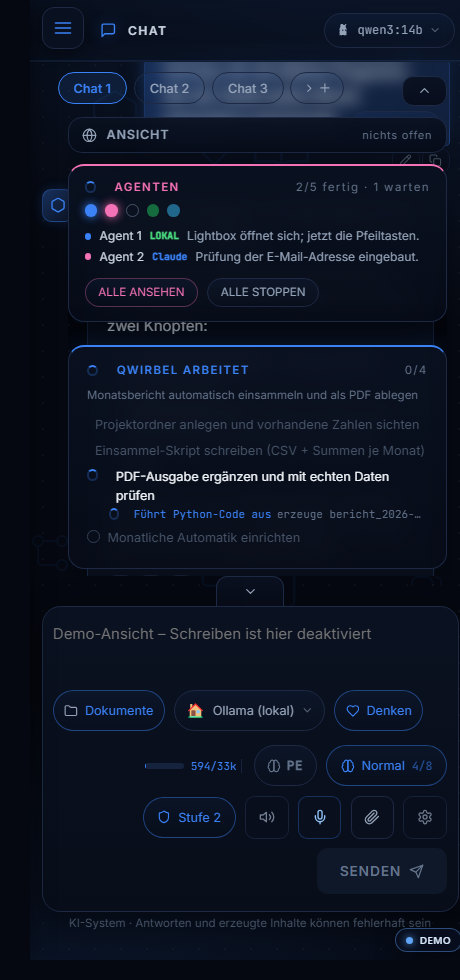
How the connection to the machine comes about
Above is what the app can do. Here is how it connects and what travels over which line.
Paired once, via QR code
A code on the screen, scanned once – after that phone and machine find each other on their own. There is no account, no registration and no brokering service in between. If there were, your screen content would travel over their line.
What is transmitted
The picture of your machine and your input – directly between the two devices. Your finger takes over the mouse, you can tap and click as if at the device itself. Handy when a job is still running and you are already out.
From the road, not only at home
On the same Wi-Fi it works with nothing further to do. From outside the route runs over a VPN – you are then technically back in the same network, just from further away. No entrance on the open internet is opened, expressly.
What the phone does NOT do
It does not compute. The models keep running on the machine; the phone displays and controls. That is why it needs no powerful device – the requirements are those of an ordinary app.
If the connection drops
The machine keeps working. A running job does not hang on the phone – on reconnecting you simply see how far it got.
Што прашуваат за ова
Does the AI run on the phone then?
No. The computing happens on your PC – the phone is the remote control. That's why it doesn't need to be a powerful phone.
Does it work away from home, not just on Wi-Fi?
On your own network it is simplest. From elsewhere it goes through a secure tunnel to your machine; you set that up deliberately, it is not open by default.
Is there an iPhone app?
The companion app is for Android. On other devices you can open the interface in the browser if your PC is reachable on the network.
What if the PC is off?
Then nothing happens – there is no server in the background carrying on. That is exactly the point of local AI.
Ова Qwirbel исто така го знае
Сите способности живеат во истата апликација – една купување, еден клуч.