
要点
Image to video
A generated or your own image becomes the starting point for a clip (WAN 2.2).
Longer sequences
End-frame chains let you join segments instead of stopping after a few seconds.
Batch processing
Queue several jobs instead of starting each one by hand.
Clear limits
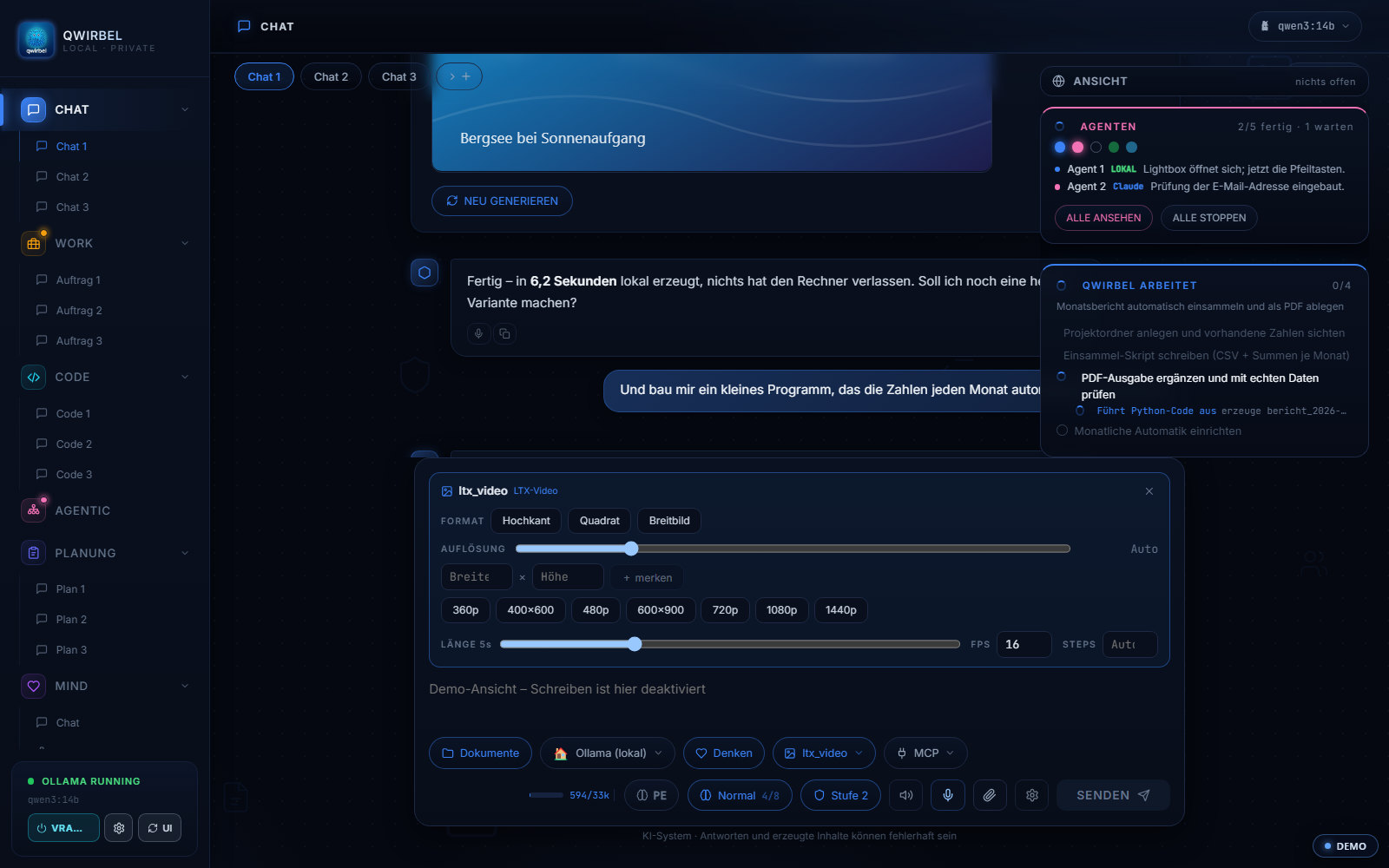
Resolution, frame rate and length can be fixed so nothing overwhelms your card.
Video settings in the chat
What actually happens while it renders
Above is what it can do. Here is what with – model families, video memory, seconds.
Which models handle video
WAN 2.1 and 2.2 are the workhorses, plus WAN Animate and VACE for motion transfer, HunyuanVideo and LTX-2.3. For audio there is ACE-Step. All run locally through ComfyUI, all from vetted sources. Which version fits your card is shown by the same filter as for image models – with size, an assessment, and an honest sentence about it.
Why video asks more than an image
A video is not one image but many – and the model has to compute them coherently so the motion holds together. So the video memory does not fill with one image but with a whole sequence. That is why two particularly hungry workflows warn you before they start, instead of disappointing you after minutes.
Turning a few seconds into a longer scene
Most workflows produce short clips. Qwirbel can chain them by making the last frame of one the first frame of the next – producing a continuous scene instead of a pile of fragments. This can run as a batch: several clips one after another without you sitting there.
What you can pin down
Resolution, computing steps, frames per second and length in seconds can be hard-limited per workflow. That is more than convenience: an oversized job blocks the graphics card for minutes, and the limit prevents exactly that. Bring your own ComfyUI workflows and you set the same limits there.
Audio survives
When a finished video is upscaled, every frame runs through the model – the audio track is carried over, not recomputed. Qwirbel never picks an upscaler that belongs to a particular video model.
Where the files end up
On your drive, in your output folder, as an ordinary video file. No upload, no watermarks, no quotas – and no questions about what you plan to do with it.
关于这一点大家会问
How long can a video be?
A single run produces a short sequence. For longer clips there are end-frame chains: the last frame of one segment becomes the first of the next, creating continuous motion. How far you can go depends mainly on video memory and patience.
What does my hardware need?
Video is the most demanding part. A graphics card is required, and more video memory means higher resolution and longer clips. Settings include presets per card size and a switch that fully frees memory after generating.
Can I go straight from text to video?
The path goes via an image: Qwirbel first creates a still from your description, and motion is generated from that. This gives you control over the starting frame before the heavy computation begins.
Does this really work without internet?
Yes. Once the models are downloaded, no connection is needed to generate. Nothing you create leaves your machine.