
That old machine
simply joins in
Most people have a second PC sitting unused. With Hyperspace you connect several machines on your own network into one group: Qwirbel may offload work to them instead of one card carrying everything.
Alates 60 € · ühekordne makse, ilma tellimuseta · Windowsile, Linuxile ja macOS-ile
Põhiline
A node with one double-click
On the extra machine run the setup file for a Hyperspace node – after that it is available to the main PC.
Work gets distributed
Jobs may be offloaded to the nodes. The main PC stays usable while computing happens elsewhere.
All on your own network
The machines talk to each other on your home or company network. There is no outside broker your jobs pass through.
Look at it in the demo
The Hyperspace tab is clickable in the browser demo before you install anything.
Three machines, one group
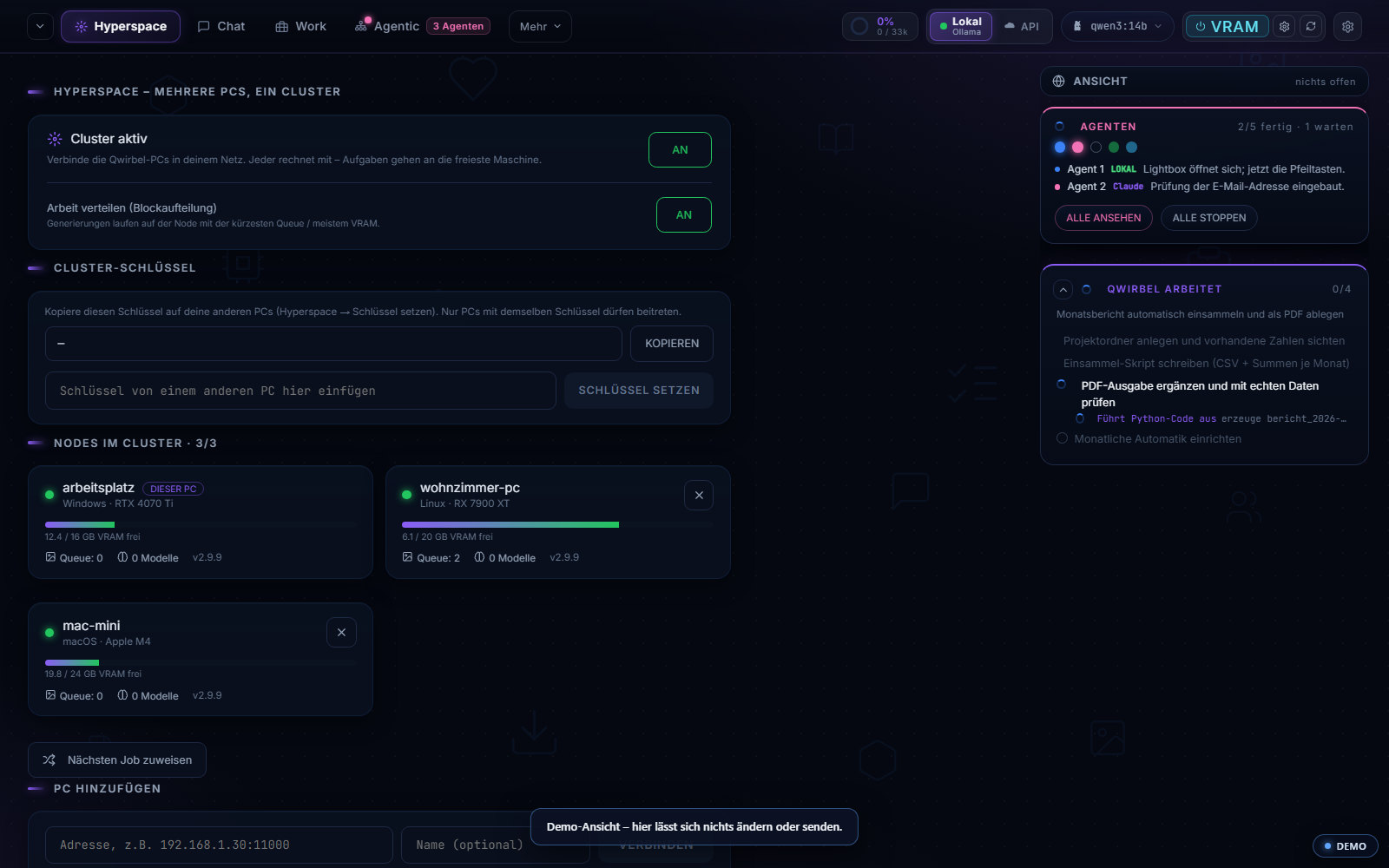
How several machines work together
Above says it is possible. Here is what gets distributed, what that buys you – and what it does not.
What actually gets distributed
The work is split into blocks and handed to the connected nodes. Each node reports how much video memory is free and what is in its queue. Operating systems can be mixed – a Windows workstation, a Linux PC and a Mac can sit in the same cluster.
What it buys and what it does not
It buys: several jobs at once without people slowing each other down, and the sum of video memory for large undertakings. It does not buy: turning an old machine into a fast one. A node with little memory stays a node with little memory – it gets smaller blocks, not more power.
What travels over the wire
The cluster runs inside your own network. There is no brokering service on the internet the data would pass through, and no entrance standing open on the public net. Anyone working from outside connects over a VPN – it then still runs inside your network, just from further away.
When a machine drops out
If a node falls away, the rest keep working; the cluster shows each machine's state as a card. For a fleet that is the real relief: you see on one page which machine is free and which is stuck, instead of asking around one by one.
Where distributing pays off most
In generating images and video, because those jobs run independently of each other. In the Server edition jobs can additionally be spread across multiple ComfyUI instances – several people then generate at the same time without waiting for each other.
Mida selle kohta küsitakse
Do the machines need identical hardware?
No. They don't have to match – a weaker node simply takes on less. What helps is a decent network link between them, because data travels back and forth.
Is this the same as the Server edition?
No, two different things. Hyperspace pools the computing power of several machines. The Server edition organises people: several employees with their own accounts, roles and limits.
Is an old machine worth it at all?
Honest answer: it depends what's inside. An old card won't make a large image model fast. For side jobs and to take load off the main PC it can still pay off.
Does the second machine have to run all the time?
No. If a node is off, the main PC simply carries on alone – nothing breaks, it is just slower.
Seda oskab Qwirbel ka
Kõik võimed elavad samas rakenduses – üks ost, üks võti.